From offer letter to productive day one
Peovix Team · October 11, 2026
From offer letter to productive day one
Hiring does not end when a candidate accepts the offer.
That is where another process begins.
And in many companies, it begins badly.
The candidate disappears from the recruiting system.
HR starts collecting the same information again.
Documents arrive through email.
IT waits for a message.
Managers chase onboarding tasks.
Payroll receives incomplete details.
The new hire joins on Monday and discovers that half of what they need is still being set up.
None of this usually happens because the company does not care about onboarding.
It happens because recruiting and onboarding are treated as separate systems.
The handoff between them is where things break.
A better approach is simple:
The candidate record should become the employee record.
Once an offer is accepted, the system should already know enough to start preparing for day one.
The candidate should not disappear after accepting the offer
Recruiting systems contain valuable information.
By the time someone receives an offer, the company may already know:
- Full name
- Phone number
- Role
- Department
- Location
- Hiring manager
- Employment type
- Start date
- Compensation
- Resume
- Interview history
- Offer details
Then the candidate accepts.
And too often, that information stops at the ATS.
HR creates a new employee record manually.
The new hire is asked to enter the same details again.
Recruiting and HR maintain two separate records.
That is unnecessary.
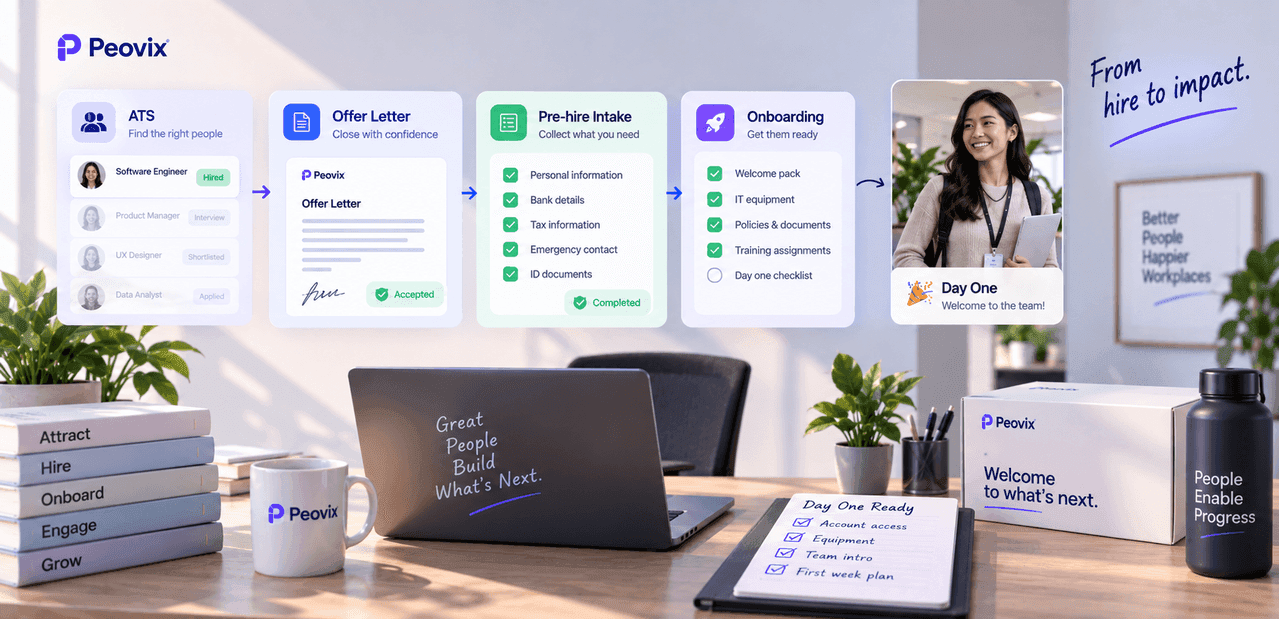
Once a hiring decision is complete, the candidate should transition directly into the pre-hire and onboarding process.
The accepted offer should trigger the next workflow
An accepted offer should not just change a candidate's status to Hired.
It should start a workflow.
For example:
Offer accepted
↓
Create pre-hire profile
↓
Collect required employee information
↓
Generate onboarding documents
↓
Request signatures
↓
Notify HR, IT, payroll, and manager
↓
Assign onboarding tasks
↓
Prepare access and equipment
↓
Schedule first-week milestones
↓
Convert candidate into active employee on the start date
That creates continuity.
The hiring process becomes the beginning of the employee lifecycle rather than a separate process that ends with an email.
Pre-hire intake fills the gap before day one
There is usually a period between accepting an offer and actually joining.
That period matters.
It is the ideal time to collect information the company needs before the employee arrives.
A pre-hire intake flow can collect details such as:
- Legal name
- Preferred name
- Home address
- Phone number
- Emergency contact
- Bank information
- Tax information
- Identification documents
- Work authorization
- Benefits information
- Equipment requirements
- Personal details required for payroll
The exact information will vary by country, employment type, and company policy.
But the principle is the same.
Do not wait until the first morning to collect information that could have been completed a week earlier.
Ask for information once
One of the most frustrating onboarding experiences is repeatedly asking a new hire for information they already provided.
The resume contains their experience.
The application contains their contact details.
The offer contains the role and compensation.
The recruiting system knows the manager and department.
Pre-hire intake should only ask for information that is missing or requires confirmation.
It should not restart the employee record from zero.
This is where a connected ATS and HRMS becomes valuable.
Information can move forward with the person.
Preboarding is part of the employee experience
Candidates form opinions about the company before their first day.
A smooth preboarding experience sends a very different signal from a collection of disconnected emails.
Compare these two experiences.
Experience one
The new hire receives:
- One email requesting bank details
- Another asking for ID documents
- A PDF contract to print and sign
- A separate message about equipment
- Another email from the manager
- Several reminders because something is missing
Experience two
The new hire receives one secure onboarding link.
They can:
- Review their offer
- Complete personal details
- Upload required documents
- E-sign agreements
- Review company policies
- Confirm equipment needs
- See what is already complete
The second experience feels more organized because it is more organized.
Onboarding packets make the process repeatable
Every new employee needs a slightly different onboarding journey.
But much of the process is predictable.
That makes onboarding a good candidate for templates.
An onboarding packet can contain a predefined set of documents, tasks, forms, and approvals based on factors such as:
- Country
- Department
- Role
- Employment type
- Seniority
- Office location
For example, a standard onboarding packet might include:
Employee tasks
- Complete personal information
- Add emergency contact
- Upload identification
- Submit bank details
- Review employee handbook
- Sign employment documents
- Complete mandatory forms
HR tasks
- Verify employee information
- Confirm payroll setup
- Review signed documents
- Assign leave policy
- Add employee to benefits
Manager tasks
- Prepare first-week plan
- Assign onboarding buddy
- Schedule introductions
- Define initial goals
- Confirm training requirements
IT tasks
- Prepare laptop
- Create accounts
- Configure access
- Set up email
- Assign software licenses
Instead of rebuilding this process for every employee, HR can reuse the appropriate workflow.
E-signatures should be part of the workflow
Onboarding often involves documents.
Employment contracts.
Confidentiality agreements.
Policy acknowledgements.
Benefits forms.
Tax documents.
Equipment agreements.
These documents should not require a separate email-and-download process when they can be included directly in onboarding.
A connected onboarding workflow can:
- Generate the appropriate document.
- Send it to the new hire.
- Collect the electronic signature.
- Record when it was signed.
- Store the completed document in the employee record.
- Notify HR if action is still required.
That removes another manual handoff.
It also creates a clearer audit trail.
Managers should not have to chase HR for status
Managers care deeply about onboarding.
But they usually do not need to manage every administrative detail.
They need visibility.
A manager should be able to answer questions like:
- Has the employee completed their documents?
- Is the laptop ready?
- Has the account been created?
- Is payroll information complete?
- Has the welcome meeting been scheduled?
- Are any onboarding tasks blocked?
- What do I need to do before Monday?
That visibility reduces back-and-forth communication.
Instead of asking HR:
Is everything ready for Maya?
the manager can see progress directly.
Onboarding should coordinate multiple teams
Onboarding is often described as an HR process.
In reality, it is cross-functional.
HR may own the overall workflow.
But many teams participate.
Recruiting
Completes the hiring process and transfers candidate information.
HR
Creates the employee record, policies, documents, and employment setup.
Payroll
Needs compensation, tax, and bank information.
IT
Provides equipment, accounts, and system access.
Manager
Prepares the role, goals, introductions, and first-week experience.
Finance or operations
May need cost-center information, expenses setup, or company cards.
The problem is not that many teams are involved.
The problem is when coordination depends entirely on email.
A workflow is better than a reminder chain
Email is useful for communication.
It is not a great workflow engine.
Consider a laptop request.
In an email-driven process:
HR emails IT.
IT replies asking for the start date.
HR sends the start date.
IT asks which equipment is required.
The manager responds.
Someone forgets to follow up.
The employee starts without a laptop.
In a connected onboarding process, the system already knows:
- Employee
- Role
- Department
- Manager
- Location
- Start date
The workflow creates the IT task with the relevant context attached.
IT completes the task.
Everyone who needs visibility can see the status.
That is much easier to manage.
Day one should not be an administrative day
The first day of a new job should be about joining the company.
Meeting people.
Understanding the role.
Learning the product.
Getting comfortable with the team.
It should not be spent filling out forms that could have been completed before joining.
A strong preboarding process moves administrative work earlier.
By the time the employee starts, the basics should already be ready.
That can include:
- Employee profile
- Signed contract
- Payroll information
- Email account
- Laptop
- System access
- Benefits setup
- Leave policy
- Required documents
- First-week schedule
The goal is simple:
Make day one feel like a beginning, not another application form.
Productive day one is really a coordination problem
Companies sometimes try to improve onboarding by adding more content.
More presentations.
More documents.
More training.
Those can be useful.
But many onboarding problems are not content problems.
They are coordination problems.
The manager thought HR was handling the laptop.
HR thought IT had already received the request.
Payroll did not receive the bank details.
The employee did not know a document was still missing.
A connected onboarding system makes ownership visible.
Every task should have:
- An owner
- A due date
- A status
- Relevant context
That alone can eliminate a large amount of onboarding confusion.
Automate based on the employee, not one generic checklist
Not every employee needs the same onboarding process.
A remote engineer in another country has different requirements from an office-based sales employee.
A contractor may have a different process from a full-time employee.
An executive may require additional approvals or equipment.
That means onboarding automation should respond to employee attributes.
For example:
If country = Nepal
→ assign Nepal employment documents
If employee type = Remote
→ trigger remote-equipment workflow
If department = Engineering
→ assign development tools and repository access
If manager = Department Head
→ include leadership onboarding tasks
This turns onboarding from a static checklist into a dynamic workflow.
The start date should drive deadlines
Onboarding tasks should also be time-aware.
The employee's start date gives the system a natural timeline.
For example:
Seven days before joining
- Collect required documents
- Confirm payroll information
- Request equipment
Three days before joining
- Confirm accounts
- Send welcome information
- Manager prepares first-week plan
One day before joining
- Verify remaining blockers
- Confirm calendar invitations
- Check equipment readiness
Day one
- Activate employee
- Start onboarding schedule
- Introduce team and manager
End of first week
- Check onboarding progress
- Collect early feedback
End of probation
- Trigger probation review
Once these milestones are automated, HR does not need to remember every follow-up manually.
Onboarding data should become employee data
Once the employee starts, information gathered during preboarding should remain useful.
Their bank details should become payroll information.
Their signed contract should become an employee document.
Their manager should remain attached to their employee profile.
Their role should become part of the organization structure.
Their onboarding tasks should become part of their employee history.
Nothing should have to be recreated.
This is another reason the ATS, onboarding system, and HRMS should be connected.
The ATS-to-HRMS handoff should be measurable
Companies measure recruiting carefully.
Time to hire.
Source of hire.
Offer acceptance rate.
Candidate conversion.
But the handoff after acceptance often receives less attention.
It is worth measuring too.
Useful metrics can include:
- Offer-to-onboarding conversion
- Pre-hire form completion
- Document completion rate
- E-signature completion
- Onboarding tasks completed before day one
- Equipment readiness
- Account readiness
- Manager task completion
- Time to productivity
- New-hire onboarding satisfaction
These metrics reveal whether the process is actually working.
Automation should surface exceptions
A good onboarding system should not require HR to watch every task manually.
Most tasks should simply complete in the background.
HR should be alerted when something needs attention.
For example:
- Missing tax document
- Unsigned contract
- IT task overdue
- Payroll details incomplete
- Manager has not completed onboarding plan
- Employee has not finished mandatory tasks
This is where automation provides real value.
Not by hiding the process.
By helping HR focus on exceptions.
AI can make onboarding even easier
AI also has a useful role in onboarding when it is connected to the underlying employee and company context.
A new hire could ask:
What do I still need to complete before Monday?
Or:
Where can I find my employment agreement?
Or:
What time should I arrive on my first day?
Or:
What is our remote-work policy?
Instead of sending these questions to HR, an AI assistant can help employees navigate the onboarding process and company policies.
The important part is context.
The assistant should know which employee is asking, what onboarding tasks apply to them, and which company policies are relevant.
What we're building with Peovix
At Peovix, we see recruiting, preboarding, onboarding, and employee management as one connected journey.
That means connecting:
- Applicant tracking
- Candidate profiles
- Offer letters
- Offer acceptance
- Pre-hire intake
- E-signatures
- Employee documents
- Onboarding packets
- HR tasks
- Manager tasks
- IT coordination
- Payroll setup
- Employee records
- Probation milestones
- Employee self-service
around the same person.
The goal is simple.
When someone accepts an offer, the company should not start over.
The information already collected should move forward.
The right workflows should begin automatically.
The right teams should know what they need to do.
And by the time the employee walks in—or logs in—for the first time, the administrative work should already be largely complete.
Because a great day one does not begin on day one.
It begins the moment the candidate says yes.
Continue
More from the blog
Less admin. More human.
Ready to run people ops in one place?
Start a 7-day trial or book a demo. Bring your regions and team size; we will map the right plan.
Book a demo · Prefer a quick walkthrough first? Explore the product in 3 minutes