
Designing careers pages candidates actually finish
Peovix Team · October 11, 2026
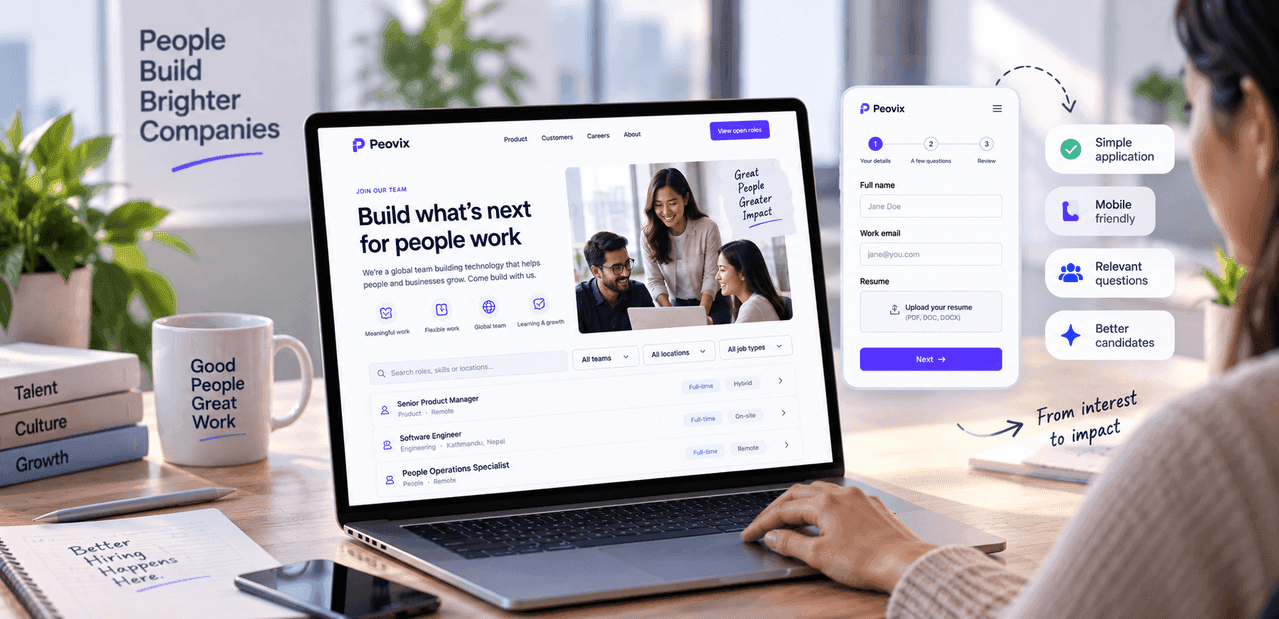
Designing careers pages candidates actually finish
Your careers page is often the first real product experience a candidate has with your company.
Before they speak to a recruiter, meet a hiring manager, or learn much about your culture, they have already formed an opinion based on one thing:
How easy it is to understand the role and apply.
That experience matters more than many companies realize.
A job might be genuinely interesting, but candidates can still drop out because the application process is confusing, too long, poorly optimized for mobile, or asks for information they have already provided somewhere else.
The result is a strange hiring problem.
Companies spend time attracting candidates, then lose them inside the application flow.
A better careers page does not need to be complicated.
It needs to make the next step obvious.
A careers page is part of the candidate experience
Recruiting teams often think about candidate experience in terms of interviews, communication, and offer management.
But the experience starts much earlier.
It starts when someone lands on a job page.
At that moment, candidates are trying to answer a few simple questions:
- What is this role?
- Where is it based?
- Is it remote, hybrid, or on-site?
- What level is it?
- What would I actually be doing?
- Am I qualified?
- What is the hiring process?
- How long will applying take?
If candidates cannot answer those questions quickly, they have to work harder than they should.
And every extra bit of uncertainty creates another opportunity to leave.
A good careers page reduces that uncertainty.
Start with clear role information
One of the easiest ways to improve job application completion is to make role information clear before the candidate clicks Apply.
Candidates should not have to scan a long job description to discover the basics.
Important role metadata should be visible immediately.
That includes:
- Job title
- Department
- Location
- Work arrangement
- Employment type
- Experience level
- Reporting structure
- Salary range, where appropriate
- Application deadline, if relevant
This information helps candidates make a quick decision about whether the role is relevant to them.
That is good for the candidate.
It is also good for the recruiting team.
The goal is not simply to maximize the number of applications.
The goal is to encourage the right candidates to complete the application.
Job descriptions should help people decide
Many job descriptions are written like internal requirement documents.
They list responsibilities.
Then requirements.
Then preferred qualifications.
Then company information.
Sometimes the candidate reaches the bottom and still does not have a clear picture of what the job actually looks like.
A stronger job description answers practical questions.
What will I work on?
Describe the actual work.
Instead of:
Responsible for cross-functional stakeholder management.
Try something closer to:
You will work with product, engineering, and customer teams to plan releases, remove blockers, and keep projects moving.
The second version gives the candidate a much clearer picture.
What does success look like?
Candidates want to understand expectations.
Explain what a strong first few months might look like.
For example:
- Learn the product and team processes
- Take ownership of a defined area
- Build relationships with key stakeholders
- Improve one existing workflow
- Deliver measurable progress against team goals
This helps candidates imagine themselves in the role.
What is actually required?
One of the biggest mistakes in hiring is treating every desired skill as mandatory.
Long lists of requirements can discourage otherwise qualified candidates.
Separate the essentials from the nice-to-haves.
For example:
Required
- 3+ years of relevant experience
- Strong written communication
- Experience working with cross-functional teams
Nice to have
- Experience in SaaS
- Familiarity with HR technology
- Experience with analytics tools
That distinction makes the role easier to understand and can improve the quality of applications.
The application form should not feel like paperwork
A candidate already has a résumé.
They may also have a LinkedIn profile.
They may have spent several minutes reading the job description and deciding whether the role is right for them.
Then they click Apply and see 40 fields.
That is where many applications become unnecessarily difficult.
A careers page should collect only the information needed at that stage.
For most roles, the first application step can be relatively simple:
- Name
- Phone, if needed
- Location
- Résumé
- LinkedIn or portfolio, where relevant
- A small number of screening questions
That is usually enough to create an applicant record and begin evaluation.
Other information can be collected later.
Avoid asking candidates to repeat their résumé
Few experiences feel more outdated than uploading a résumé and then being asked to manually type everything from that résumé into separate fields.
Education.
Employment history.
Job titles.
Dates.
Skills.
Certifications.
Candidates immediately understand that they are doing work for the system.
Not for the hiring process.
If your recruiting platform can parse the résumé, use that information.
If it cannot, ask whether the information is truly necessary during the first application.
The application should not become a data-entry exercise.
Mobile matters more than recruiting teams think
Candidates do not always apply from a laptop.
They discover jobs through:
- Social media
- Messaging apps
- Job boards
- Search
- Employee referrals
- Mobile email
That means many candidates first encounter your job opening on a phone.
If the application flow only works comfortably on desktop, there is a good chance you are losing candidates.
A mobile-friendly careers experience should make it easy to:
- Read the role
- Understand key requirements
- Upload a résumé
- Answer screening questions
- Review the application
- Submit successfully
Buttons should be easy to tap.
Fields should be readable.
Forms should not require constant zooming.
Uploads should work from cloud storage or mobile devices.
And candidates should never have to fight the interface just to apply.
Screening questions should have a purpose
Screening questions can help recruiting teams keep the pipeline clean.
But they can also make applications unnecessarily long.
Every question should answer a real hiring need.
Useful screening questions might include:
- Are you legally authorized to work in this location?
- Are you available for the required work arrangement?
- How many years of experience do you have with a specific required skill?
- Do you hold a required certification?
- Are you comfortable with the stated working hours?
These questions help identify clear eligibility requirements.
Less useful questions are often vague, repetitive, or better discussed later.
For example:
Why do you want to work here?
That can be a reasonable interview question.
But forcing every applicant to write a long essay before anyone has reviewed their profile adds friction without necessarily improving screening quality.
Optional questions can work well when they provide useful context without blocking the application.
Better application design improves pipeline quality
Shorter forms are sometimes misunderstood as reducing hiring quality.
The opposite can happen.
When an application process is too long, the candidates most willing to complete it are not necessarily the most qualified.
They may simply be the candidates with the most time.
A clear and efficient application lets more relevant candidates enter the pipeline.
Recruiters can then use structured screening criteria to evaluate them.
The quality comes from the screening process.
Not from making the application difficult.
Keep the candidate informed after submission
The experience does not end when the candidate clicks Submit.
A good application flow should immediately confirm that the application was received.
Candidates should not have to wonder whether the form worked.
The confirmation can be simple:
- Application received
- Role applied for
- Expected next step
- Approximate response timeline
- Contact information, if appropriate
Even a short acknowledgement makes the process feel more professional.
The recruiting system should also make it easy to trigger follow-up communication as candidates move through the pipeline.
Careers pages are also employer-brand pages
Candidates are not only evaluating the job.
They are evaluating the company.
A careers page can help communicate what it feels like to work there.
That might include:
- Company mission
- Culture
- Team photos
- Employee stories
- Benefits
- Work philosophy
- Learning opportunities
- Career growth
- Remote-work approach
- Office locations
The key is to keep this information connected to the candidate's decision.
A careers page should not feel like a corporate brochure.
It should help someone decide:
Would I want to work here?
Search and filtering become important as you grow
A company with five open roles may not need sophisticated job discovery.
A company with 50 or 500 does.
Candidates should be able to filter roles by relevant criteria such as:
- Department
- Location
- Employment type
- Work arrangement
- Seniority
- Team
Search should work with job titles, skills, or keywords.
The goal is simple.
Help candidates reach relevant roles quickly instead of forcing them to browse a long list.
The application should create clean recruiting data
A good careers page is not only a front-end experience.
It is also the beginning of the recruiting workflow.
When someone applies, the recruiting system should capture structured information that can support:
- Candidate screening
- Pipeline stages
- Interview scheduling
- Recruiter ownership
- Hiring-manager collaboration
- Candidate communication
- Reporting
- Offer workflows
- Onboarding
This is where thoughtful application design becomes operationally important.
If the careers page captures poor or inconsistent information, recruiters spend time cleaning the pipeline later.
If it captures the right information in a structured way, the entire hiring process becomes easier to manage.
Careers and recruiting should connect to the HRMS
The hiring journey does not end with an accepted offer.
That is where the employee journey begins.
A connected recruiting and HR platform can turn an accepted candidate into an employee without requiring HR to recreate everything manually.
Candidate information can flow into onboarding.
For example:
Candidate accepts offer
↓
Create employee record
↓
Assign department and manager
↓
Generate onboarding tasks
↓
Collect employment documents
↓
Set up payroll information
↓
Assign policies and benefits
↓
Schedule probation milestones
That transition matters.
A disconnected recruiting system creates another manual handoff.
A connected platform turns hiring into the first stage of the employee lifecycle.
Measure where candidates drop out
Recruiting teams often measure:
- Applications
- Interviews
- Offers
- Hires
But application completion itself is worth measuring.
Useful metrics include:
- Careers page views
- Job-detail views
- Apply clicks
- Application starts
- Application completions
- Completion rate
- Mobile vs desktop completion
- Drop-off by application step
- Time to complete
- Source of applicant
If many candidates click Apply but never submit, something in the application experience may be creating unnecessary friction.
That is a product problem.
And it can be improved.
Recruiting software should reduce friction, not create it
The best careers pages do not ask candidates to learn how your recruiting system works.
They simply help them move forward.
Candidates can understand the role.
They can decide whether it fits.
They can apply without unnecessary work.
Recruiters receive structured information.
Hiring managers get a cleaner pipeline.
And successful candidates can move directly into onboarding.
That is what good recruiting technology should do.
Not add another process.
Remove one.
What we're building with Peovix
At Peovix, we see recruiting as part of the broader employee lifecycle rather than a separate system.
That means connecting:
- Careers pages
- Job openings
- Candidate applications
- Screening questions
- Applicant tracking
- Interview workflows
- Hiring decisions
- Offer management
- Employee records
- Onboarding
- Documents
- Payroll setup
- People operations
around one connected platform.
The careers page is the beginning of that experience.
And that beginning should feel simple.
Candidates should not have to fight through a form to show interest in your company.
They should understand the opportunity, provide the information that actually matters, and move forward.
A better recruiting experience does not need more fields.
It needs fewer reasons to quit halfway through.
Continue
More from the blog
Less admin. More human.
Ready to run people ops in one place?
Start a 7-day trial or book a demo. Bring your regions and team size; we will map the right plan.
Book a demo · Prefer a quick walkthrough first? Explore the product in 3 minutes